
AI-powered IT service management · Built on ServiceNow · A CubeSimple product

Describe it.
Get it sorted.

OpsLifter is one AI assistant for employees and fulfillers, built on ServiceNow. Its AI takes an IT issue from the first message to resolved, with every AI change approved by a person.

AI self-helpAI ticketsAI-run SOPsTrackApproveResolve
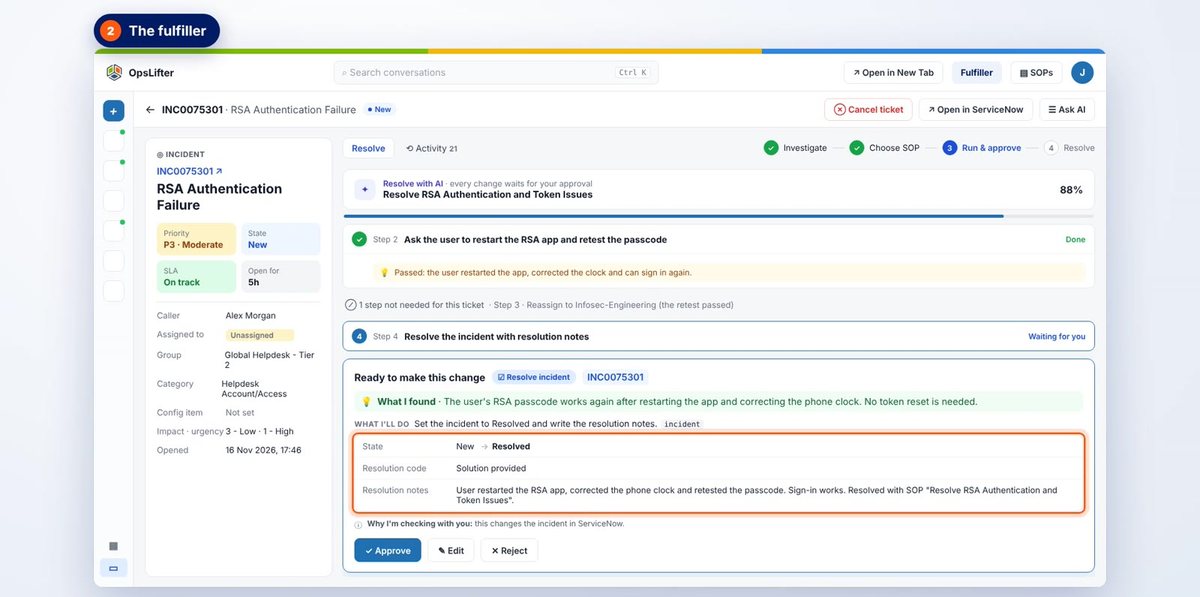
OpsLifter showing what it found and the change it will make, waiting for the fulfiller's approval
AI for the service deskFaster fixes · full control

One AI assistant.
Both sides of the ticket.

AI on ServiceNow

AI inside your Employee Service Center and service desk.

AI that learns your fixes

Trained on your resolved incidents and approved SOPs.

AI-run SOPs

AI investigates, picks the SOP and runs it step by step.

Human-approved AI

No AI change without a person's OK, with undo.

Overview

An AI assistant on top of ServiceNow.

OpsLifter's AI takes an IT issue from the first message to resolved. The AI understands the problem in plain words, finds how similar incidents were fixed, picks the right approved SOP and drafts every change, then a person approves it.

For the employee

Describe it

Ask the AI for help in plain words. Get proven fixes first, an AI-prefilled ticket only when needed, and live status any time.

Self-helpReportRequestTrack

OpsLifter AI

Understands, matches, drafts

Reads the issue, searches your resolved incidents and approved SOP library, and prepares every step and change for review.

Gemini AI on Google Cloud

For the fulfiller

Approve it

Open a ticket the AI has already investigated. Run the SOP with AI, step by step, and approve each change before it happens.

InvestigateSOPApproveResolve
Runs on your ServiceNowIncidents & requestsResolved-incident historyApproved SOP libraryService catalogEvery change approved

The challenge

Without AI, one IT issue means too many hand-offs.

The fix often already exists in your ServiceNow, in last month's resolved incident or an approved SOP. Nobody finds it in time.

OpsLifter's AI removes the hand-offs: the employee gets the fix first, and the fulfiller starts at the answer.
01

Search

Employees hunt through the portal for the right form.

02

Fill a form

They guess the category and team, often wrongly.

03

Wait

Tickets queue up, even for issues they could fix themselves.

04

Bounce

Mis-routed tickets move between teams; duplicates pile up.

05

Re-solve

An engineer works out a fix someone already found.

Who we serve

AI for teams that run IT on ServiceNow.

Employees

Anyone who needs IT help

No forms, categories or ticket numbers to learn. Just tell the AI the problem.

Fulfillers

Service desk agents

Resolver groups who want AI to do the investigation and have the right SOP ready.

Leaders

IT & service desk heads

Fewer tickets and faster resolution with AI, and full control over every change.

Platform

ServiceNow teams

AI on the instance you already run, using your own data, SOPs and approvals.

AI use cases

AI from the first message to resolved.

Each use case is shown in the OpsLifter videos below.

Employee · Self-help

AI self-help troubleshooting

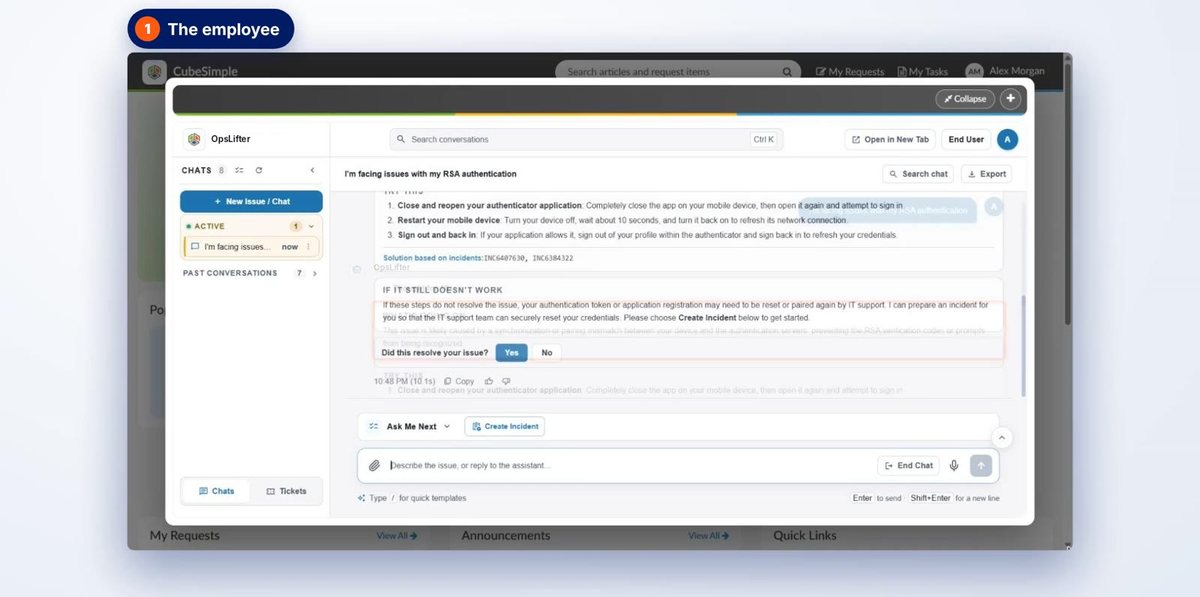
“I can’t sign in with RSA.” OpsLifter explains what’s likely going on and gives safe steps to try, based on how similar incidents were fixed.

  • Sign-in and MFA issues, Outlook not working
  • Password resets, moving MFA to a new phone
  • Solved with no ticket when the steps work
OpsLifter chat giving self-help steps

Employee · Report & request

AI-prefilled tickets, no duplicates

When self-help isn’t enough, the AI drafts the incident: details, problem and category picked from similar past incidents.

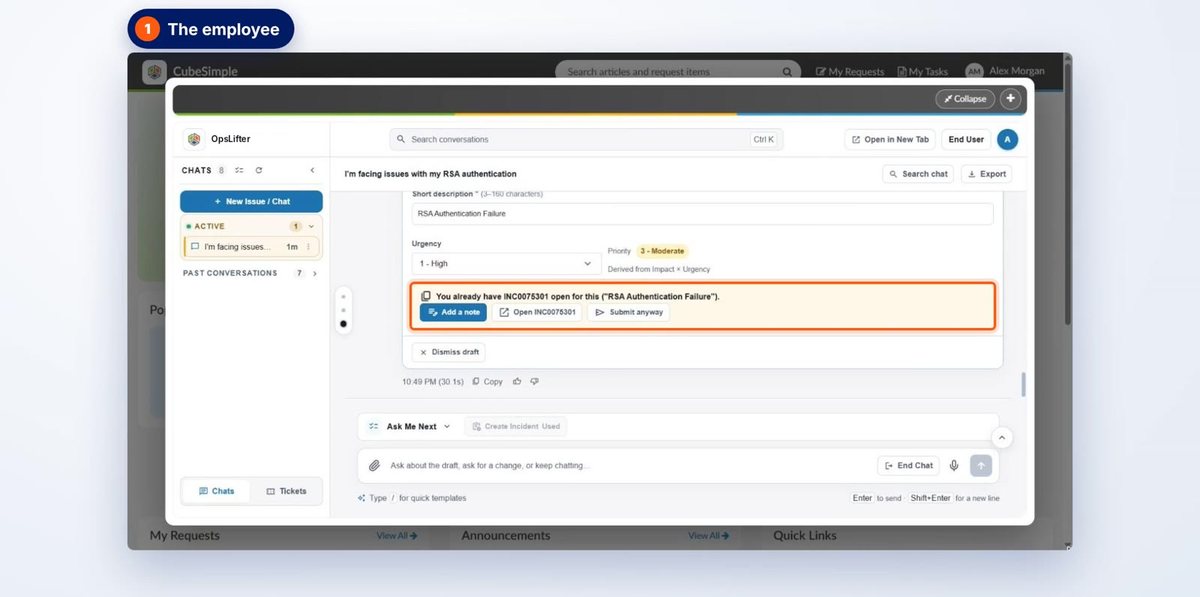
  • Spots an open incident and adds a note instead of a duplicate
  • Catalog requests (like a new laptop) with the form filled in
  • Track every incident and request in one place
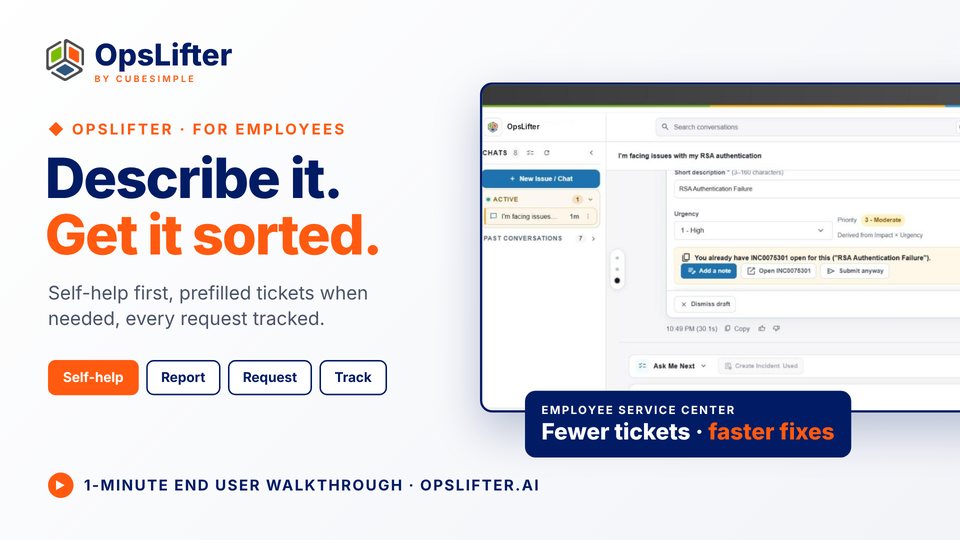
OpsLifter spotting an existing open incident

Fulfiller · Investigate & SOP

AI-investigated tickets and ranked SOPs

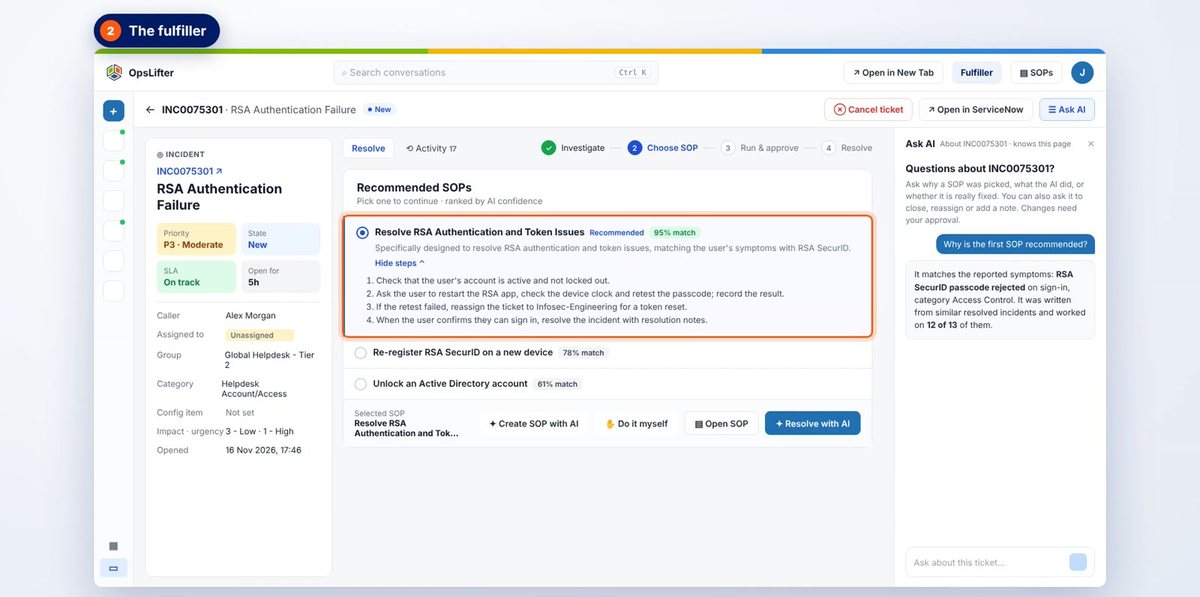
One click and the AI reads the ticket, searches your approved SOP library and ranks the best matches, with the reason for each.

  • Ask why an SOP was picked or what the likely cause is
  • AI runs each SOP step; steps that need a person wait
  • Skips steps not needed for this ticket
Recommended SOPs ranked by AI

Fulfiller · Approve & resolve

Approve, resolve, undo

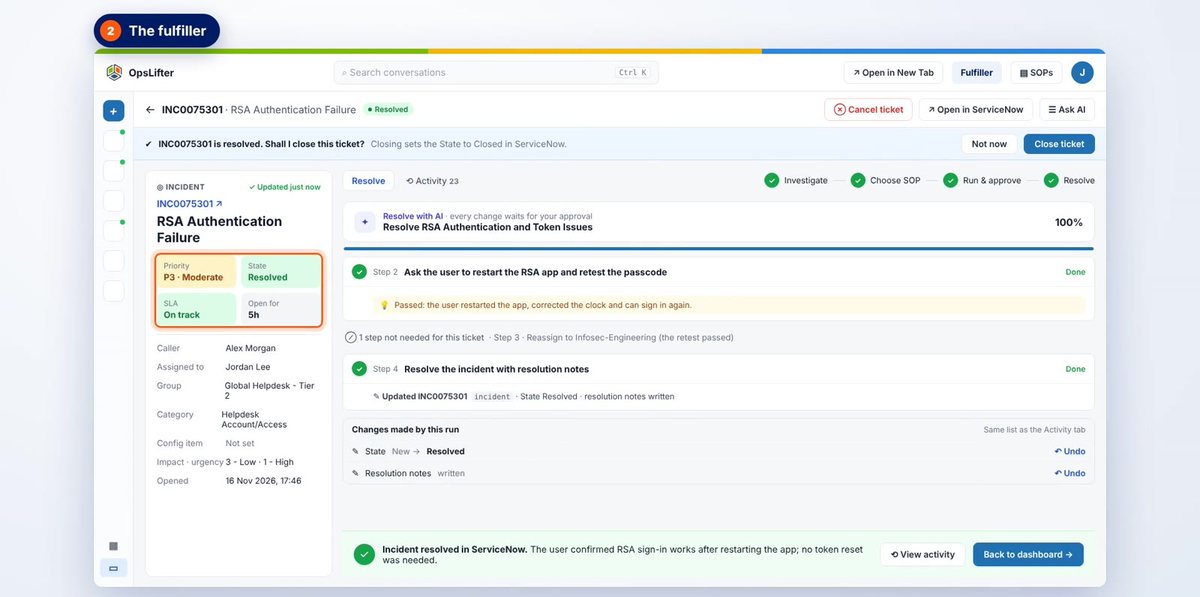
Before anything changes, the AI shows what it found, what it will change and why. You approve, and the incident is resolved with notes written.

  • Every change listed with undo
  • Dashboard counts what was resolved with AI
  • Employee sees the status and who fixed it
Resolved incident with every change listed

Architecture

How OpsLifter AI fits your ServiceNow.

OpsLifter adds an AI layer on Google Cloud between your people and ServiceNow. ServiceNow stays your system of record, and no AI change lands without a person's approval.

Channels

Where people use it

  • EmployeesAI chat panel in the Employee Service Center
  • FulfillersAI workspace for the service desk
  • Coming nextMicrosoft Teams and mobile app

OpsLifter AI · Google Cloud

The AI layer

  • Gemini AIUnderstands the issue in plain words
  • Knowledge indexResolved incidents, approved SOPs, service catalog
  • AI SOP runnerRuns SOP steps; waits when a person is needed
  • Approval & auditEvery AI change approved, logged, with undo

System of record

Your ServiceNow

  • Scoped appOpsLifter app and portal panel inside ServiceNow
  • ITSM dataIncidents, requests, SOP library, catalog
  • IntegrationSingle sign-on and ESB connection
  1. 1Employee asks the AI
  2. 2AI searches your ServiceNow history and SOPs
  3. 3AI drafts the fix, ticket or change
  4. 4A person approves
  5. 5ServiceNow is updated, with undo

Why choose OpsLifter

AI does the legwork. You approve.

What makes OpsLifter different from a portal search box or a generic chatbot.

01

AI that learns your own fixes

AI answers come from your resolved incidents and approved SOPs, not generic advice.

02

One AI, both sides of the ticket

The same AI helps the employee report it and the fulfiller resolve it. No lost context.

03

Human-approved AI, always

The AI shows what it found, what it will change and why. Every change logged with undo.

04

AI native to ServiceNow

AI inside your Employee Service Center and service desk. No new tool, no rip-and-replace.

Traditional portalGeneric chatbotOpsLifter AI
How employees askFind and fill a formPlain wordsPlain words
Where answers come fromKnowledge articlesGeneral knowledgeYour resolved incidents & approved SOPs
Helps the fulfillerNoRarelyInvestigates and runs the SOP
Changes in ServiceNowManualManualDrafted by AI, approved by a person, with undo

Pricing model

Start small with AI, scale when it works.

Begin with an AI pilot on one service area, then roll OpsLifter out to every employee and resolver group.

Start here

Pilot

Prove OpsLifter AI on one service area of your ServiceNow.

Talk to us

  • AI self-help and AI-prefilled tickets
  • AI-run SOPs for one resolver group
  • Setup on your ServiceNow instance
  • Weekly results reviews
Request pricing

At scale

Enterprise

OpsLifter AI across channels, with CubeSimple running it for you.

Talk to us

  • Everything in Standard
  • Microsoft Teams and mobile (as released)
  • On-premises hosting option
  • Managed service by CubeSimple
Request pricing

Indicative tiers. Final pricing is agreed for each engagement, based on users, resolver groups and services in scope.

Demo

See OpsLifter AI in action.

Watch here, or copy a link to share exactly the video you need.

End to end · 2:58

OpsLifter end-to-end demo

Follow one IT issue from "it's broken" to resolved. The employee describes it to the AI, the fulfiller runs an AI-picked SOP, and every change is approved before it reaches ServiceNow.

Employee Service Center · 1:24

OpsLifter for employees

Get IT help from AI in plain words, right inside the Employee Service Center. AI self-help first, AI-prefilled tickets when needed, catalog requests filled in for you, and every ticket tracked in one place.
Watch

Service desk · 1:40

OpsLifter for fulfillers

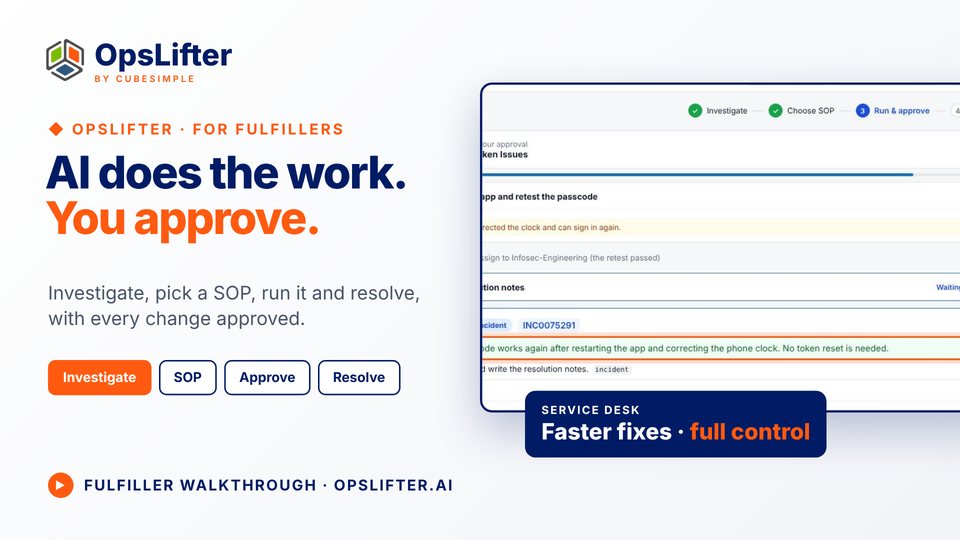
From your queue to a resolved ticket. OpsLifter's AI investigates, ranks the best approved SOP, runs it step by step and waits for your approval before anything changes in ServiceNow.

Watch

FAQ

Questions users ask

Does OpsLifter replace ServiceNow?

No. OpsLifter sits on top of your ServiceNow instance and works inside the Employee Service Center and service desk you already use.

What AI does OpsLifter use?

OpsLifter runs on Google Cloud with Gemini AI. The AI reads the issue, searches your resolved incidents and approved SOPs, and drafts the fix or the change for a person to approve.

Can the AI change things on its own?

No. OpsLifter drafts every change and explains what it found and why. Nothing changes in ServiceNow until a person approves it, and every change can be undone.

Where do the AI’s answers come from?

From your own data: resolved incidents, your approved SOP library and your service catalog. The AI does not guess from the open internet.

Who uses OpsLifter?

Employees use it to get help, report issues, make requests and track tickets. Fulfillers use it to investigate, run SOPs and resolve tickets.

What happens when self-help doesn’t work?

OpsLifter drafts a prefilled incident for the employee, and checks for an open incident first so there are no duplicates.

How do we get started?

Most teams start with an AI pilot on one service area. Use Request a demo and we’ll walk you through it on your ServiceNow.

Request a demo

See OpsLifter AI on your ServiceNow.

We only use your details to arrange the demo.